Independent guide: not affiliated with MEPCO, PITC, WAPDA or any government body. Bills open only on the official PITC website. Read the disclaimer.
Last checked: 7 November 2026
To view a MEPCO bill online, the official PITC bill page asks for one number: your 14-digit reference number, or your Customer ID instead. This guide explains what the official form accepts, how to enter the reference number so it works the first time, and what to do when it does not. When your number is ready, you can check your MEPCO bill with our checker, which opens the official page in a new tab.
What the official form asks for
The official online bill page for MEPCO consumers is run by PITC at bill.pitc.com.pk. The page is titled “MEPCO Web Bill”, is marked “Powered by PITC”, and shows a box headed “Search Your Electricity Bill”. MEPCO’s own website links its “MEPCO Bill” menu item to this page.
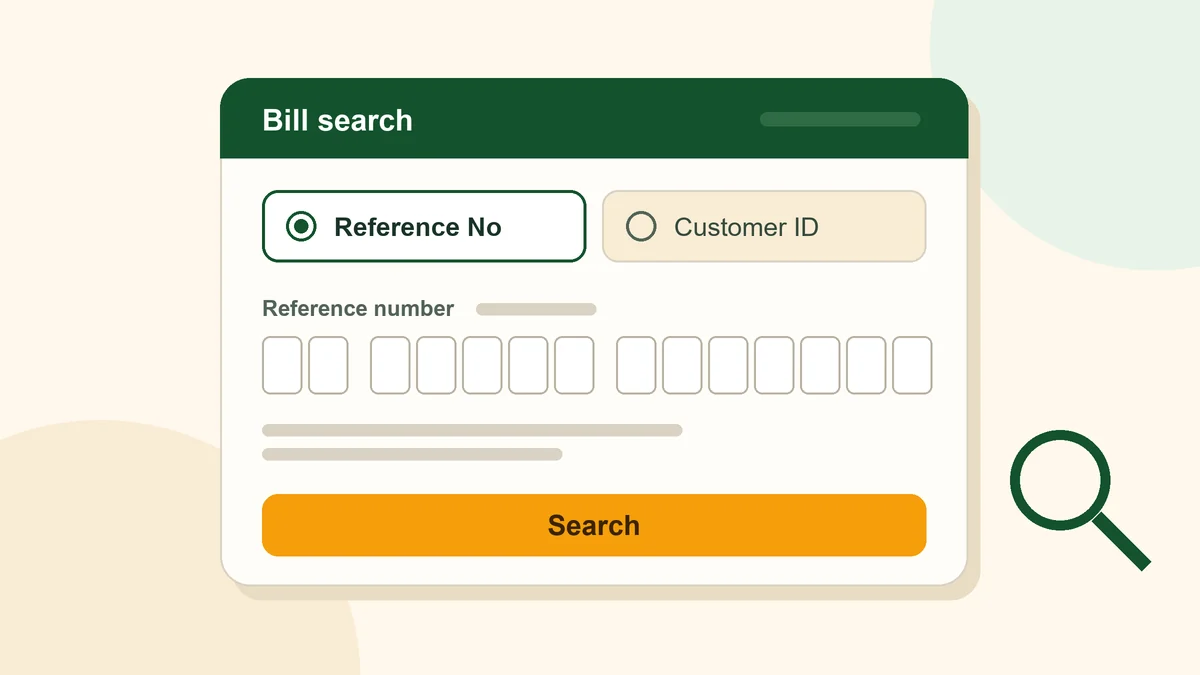
The search box gives you two ways to look up a bill:
- Reference No. This option is selected by default. The number box says “Enter 14-digit valid reference no” and takes up to 14 characters.
- Customer ID. A separate option for searching with your Customer ID instead of the reference number.
PITC’s bill service home page describes the same idea in its own words: “Access your latest bill in seconds using reference or consumer number.”
Where the reference number is printed on the bill
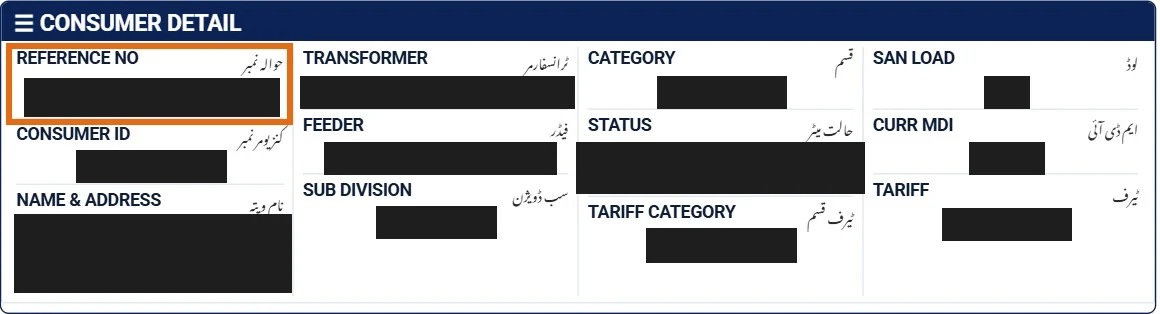
On a current MEPCO bill, look at the top-left box headed Consumer Detail. The first field in that box is labelled Reference No (in Urdu, حوالہ نمبر), and the 14-digit number printed under the label is the one the official bill page asks for. The field just below it, Consumer ID (کنزیومر نمبر), holds the shorter 10-digit number that the official form also accepts if you choose the Customer ID option.
The same two numbers are printed again at the bottom of the bill, on the slip marked “Bank Stamp”. If the top of your bill is torn or smudged, check the Reference No line on that bottom slip.
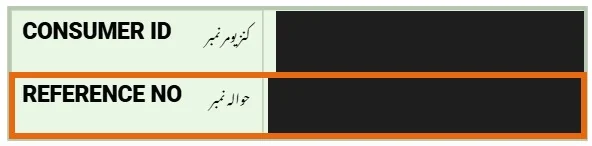
Type the number exactly as it is printed, digits only, without spaces or dashes.
How to enter the 14-digit reference number
Follow these steps on our checker or directly on the official page.
- Choose Reference No. On the official page it is already selected. On our checker, pick the reference number option.
- Type digits only. Enter the number without spaces, dashes, dots or letters. The official form accepts digits only, so a number copied with spaces in it will be refused.
- Count to fourteen. A reference number has 14 digits. If you have fewer or more, you may have copied a different number or missed a digit.
- Open the bill. Press the check button. The official PITC bill page opens in a new tab and shows your bill there. Our site never sees the number.
Helpful tip
After you paste the number, count the digits once more. If you do not have fourteen, check whether you copied a different number by mistake.
Reference number, Customer ID or something else?
People often have several numbers from their electricity account and are not sure which one the bill search wants. Here is what the official form accepts, as read on 7 November 2026.
| Number | What the official form says | Accepted on the official form? |
|---|---|---|
| Reference number | “Enter 14-digit valid reference no”; the default option | Yes |
| Customer ID | A separate option; the page does not state its length in words (on the bill, the Consumer ID is a 10-digit number) | Yes |
| Meter number | Not one of the options | No |
| CNIC | No CNIC field on the form | No |
The official form’s own check accepts any number from 10 to 14 digits long, which covers both options. The form does not say in words how many digits a Customer ID has; on the MEPCO bills we have seen, the Consumer ID is a 10-digit number. If you search by Customer ID, select that option first and enter the number exactly as you have it.
If you only have your CNIC, read our guide to MEPCO bill check by CNIC. On the official pages we read, a CNIC cannot be used to search for a bill.
Error message: “Given Ref/App No is invalid”
The official form shows the message “Given Ref/App No is invalid” when the number fails its check. Going by the form’s own rule, that happens when:
- the number is shorter than 10 digits or longer than 14 digits, or
- the number contains anything other than digits, such as a space, a dash or a letter.
To fix it, clear the box, type the digits again without any spaces or symbols, and count them. If the number still will not work, use one of the routes below.
If you cannot find your reference number
- Ask MEPCO. MEPCO’s contact page lists the phone number 0319-9757789 and the email address [email protected]. These are the general contact details shown on its website; it does not describe them as a reference-number service.
- Get a duplicate bill. MEPCO’s FAQ says duplicate bills are available at its customer service centres. Our duplicate bill guide explains the online and office routes.
- In Multan? The bill page is the same for every city. See our MEPCO bill check for Multan guide for the head office and complaint routes.
Where else the reference number is used
The reference number is not only for viewing a bill. The NEPRA Consumer Service Manual 2025, published on mepco.com.pk, lists the “Reference No.” among the items a bill shows and defines it as a dedicated number allotted to a consumer for identification (clause 6.4.1). It comes up in other places too:
- CNIC registration. PITC’s CNIC registration portal, which links a consumer’s CNIC to an electricity account, starts by asking: “Please Enter Your Reference No.”
- Applications. The application form in the same manual (Annexure I, Part I, item 10) asks for the reference number of any existing connection you already have.
So the reference number is worth keeping somewhere safe, for example in your phone’s notes.
Important
Do not enter a CNIC, phone number or payment information into a third-party bill checker. This site never asks for those details. The PITC complaint portal also warns consumers not to pay for electricity services through Easypaisa, JazzCash or direct bank transfers to an individual’s account.
The small “U” / “R” box next to the number
The official search box has a small drop-down next to the number field with two choices, “U” and “R”. The page does not explain what these letters mean, and we have not found an official explanation. We will add guidance here once an official MEPCO or PITC source explains it.
Frequently asked questions
How many digits is a MEPCO reference number?
The official PITC form asks for a 14-digit reference number. Its number box takes up to 14 characters.
Can I enter the reference number with spaces?
No. The official form accepts digits only. Remove any spaces or dashes before you search.
What if I do not have a reference number?
The official page also lets you search by Customer ID. Select the Customer ID option first, then enter that number.
Does MEPCO’s FAQ explain the reference number?
No. When we read MEPCO’s FAQ page on 7 November 2026, it had no entry on the reference number or the Customer ID.
Does this site keep my reference number?
No. Our checker opens the official PITC page in a new tab. We never see or store your number.